Main Menu > Edit Menu > Settings
Settings - User
The User Settings window contains the following fields and options:
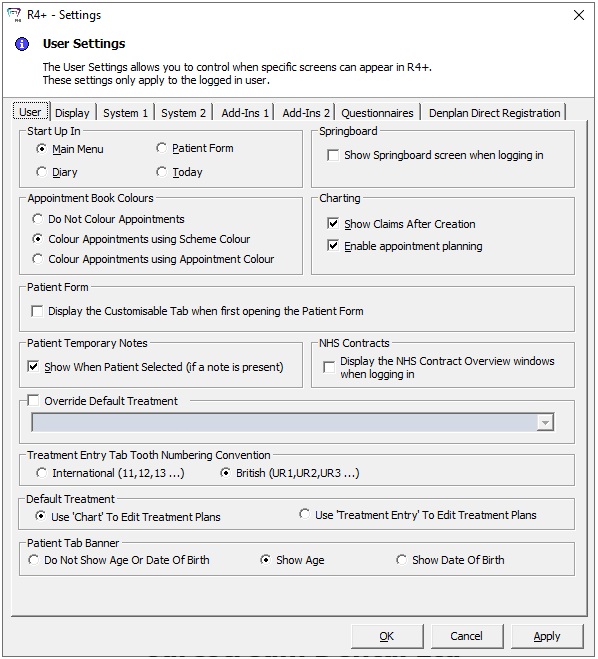
Start-Up In
-
Main Menu — Select this option if you want the Main Menu window to be displayed when you log in to R4+.
-
Diary — Select this option if you want the Planner window to be displayed when you log in to R4+.
-
Patient Form — Select this option if you want the Patients window to be displayed when you log in to R4+.
-
Today — Select this option if you want the Today window to be displayed when you log in to R4+.
Springboard
-
Show Springboard screen when logging in — Select this option if you want the Springboard window to be displayed when you first log in to R4+.
-
If selected, the Springboard window is displayed on top of R4+.
Appointment Book Colours
-
Do Not Colour Appointments — Select this option if you do not want booked appointments in the Planner to be coloured.
-
Colour Appointments using Scheme Colour — Select this option if you want booked appointments in the Planner to be coloured using the patient's scheme.
-
Colour Appointment using Appointment Colour — Select this option if you want booked appointments in the Planner to be coloured using the colour assigned to the appointment in Appointment Types.
Charting
-
Show Claims After Creation — Select this option if you want the NHS claim form to be displayed automatically when a course of treatment is closed.
-
Enable Appointment Planning — Select this option if you want to be able to create planned appointments in the patient's chart.
Patient Form
-
Display the Customisable Tab when first opening the Patient Form — Select this option if you want the customisable tab to be the active tab when accessing a patient's record.
Patient Temporary Notes
-
Show When Patient Selected (if a note is present) — Select this option if you want the Patient Temporary Note to be displayed automatically, if present, when accessing a patient's record.
NHS Contracts
-
Display the NHS Contract Overview windows when logging in — Select this option if you want the NHS Contract Overview window to be displayed when you first log in to R4+.
-
If selected, the NHS Contract Overview window is displayed on top of R4+.
-
Override Default Treatment — Select this option and select the appointment type from the drop-down list if you want to override the default setting.
Treatment Entry Tab Tooth Numbering Convention
-
International (11,12,12...) — Select this option if you want to use the International tooth numbering convention.
-
British (UR1,UR2,UR3...) — Select this option if you want to use the British (or Palmer) tooth numbering convention.
Default Treatment
-
Use 'Chart' to Edit Treatment Plans — Select this option if you want to open the Chart when you click Edit TP on the NHS claim form.
-
Use 'Treatment Entry' to Edit Treatment Plans — Select this option if you want to open the Treatment Entry window when you click Edit TP on the NHS Claim Form.
Patient Tab Banner
-
Do Not Show Age or Date of Birth — Select this option if you do not want the patient's age or date of birth to be displayed on the patient banner.
-
Show Age — Select this option if you want the patient's age to be displayed on the patient banner.
-
Show Date of Birth — Select this option if you want the patient's date of birth to be displayed on the patient banner.
-
These settings apply only to the logged-in user.