Main Menu > Edit Menu > Settings
Settings - Questionnaires
The Questionnaires window contains the following fields and options:
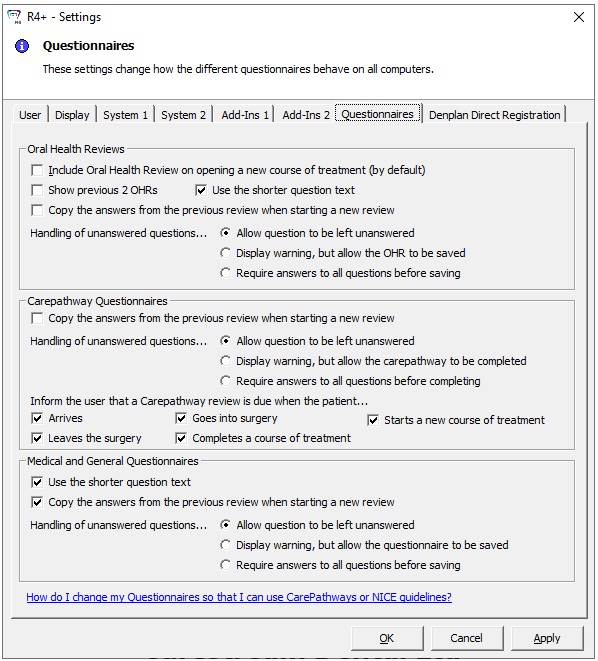
Oral Health Reviews
-
Include Oral Health Review on opening a new course of treatment (by default) — Select this option to include the Oral Health Review when you start treatment for a patient.
-
Show previous 2 OHRs — Select this option if you want to see the last two Oral Health Reviews.
-
Use the shorter question text — Select this option for shorter questions.
-
Copy the answers from the previous review when starting a new review — Select this option if you want the previous answers to be displayed on the questionnaire when you start a new review.
-
Handling of unanswered questions — Select from the following:
-
Allow question to be left unanswered
-
Display warning, but allow the OHR to be saved
-
Require answers to all questions before saving
Carepathway Questionnaires
-
Copy the answers from the previous review when starting a new review — Select this option if you want the previous answers to be displayed on the questionnaire when you start a new review.
-
Handling of unanswered questions — Select from the following options:
-
Allow question to be left unanswered
-
Display warning, but allow the carepathway to be completed
-
Require answers to all questions before completing
-
Inform the user that a Carepathway review is due when the patient — Select from the following options:
-
Arrives
-
Goes into surgery
-
Starts a new course of treatment
-
Leaves the surgery
-
Completes a course of treatment
Medical and General Questionnaires
-
Use the shorter question text
-
Copy the answers from the previous review when starting a new review — Select this option if you want the previous answers to be displayed on the questionnaire when you start a new review.
-
Handling of unanswered questions — Select from the following options:
-
Allow question to be left unanswered
-
Display warning, but allow the questionnaire to be saved
-
Require answers to all questions before saving