Main Menu > Edit Menu > Settings
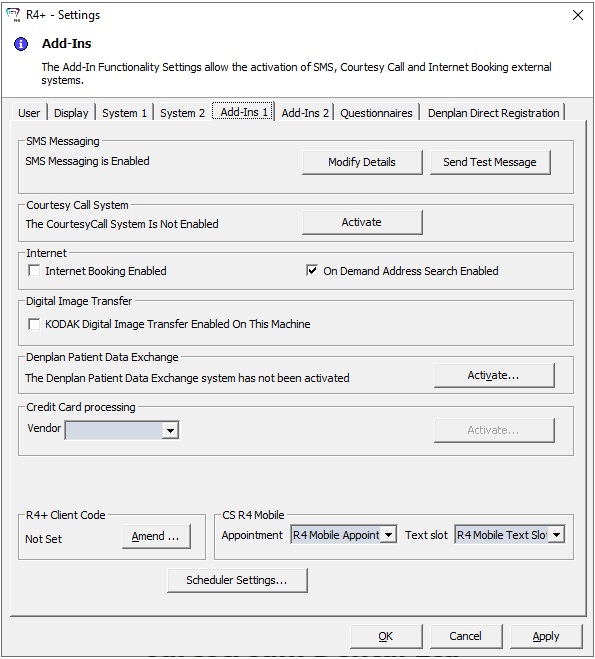
Settings - Add-Ins 1
The Add-Ins window contains the following fields and options:
SMS Messaging
-
SMS Messaging is Enabled — Click Modify Details to display the SMS Messaging Signup window; when the details of the contract are established, click Confirm Contract.
-
Use a single SMS Messaging Configuration for all Clinics — If you are a multi-clinic practice, select this option to use the same configuration for SMS messages in all clinics.
Courtesy Call System
-
Activate — Click to display the Courtesy Call Signup window.
Internet
-
Internet Booking Enabled — Click to enable booking through the internet.
-
On Demand Address Search Enabled — Click to enable address search.
Digital Image Transfer
-
KODAK Digital Image Transfer Enabled On This Machine — Select this option to transfer digital images using the Kodak system.
Denplan Patient Data Exchange
-
Activate — Click this button to display the Denplan Patient Data Exchange Sign-Up window.
RedCard Credit Card processing
-
Activate — Click this button to display the Redcard Settings window. This service must be activated on every computer using RedCard.
R4+ Client Code
-
Activate — Click this button to display the R4+ - Client Code window. A client code is required to activate the Courtesy Call system, the Denplan Messaging system, and R4+ integration with Steritrak.
CS R4 Mobile
-
Appointment — Select R4 Mobile Appointment from the drop-down list.
-
Text Slot — Select R4 Mobile Text Slot from the drop-down list.
Scheduler Settings — Click this button to display the Scheduler Settings window.