Working with Insurance Carriers > Working with Insurance Plans
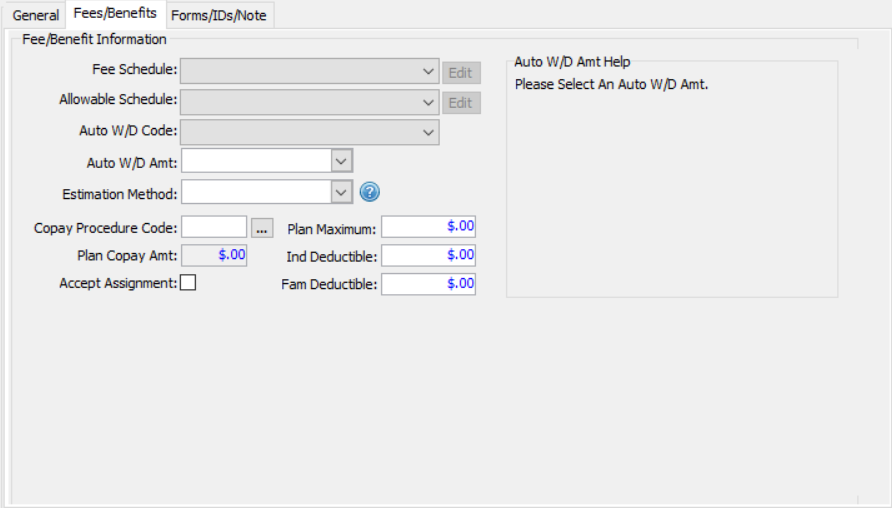
Use the Fees/Benefits tab of the Plan Data Entry window to provide schedule information, co-payment information, and detailed insurance coverage information.
To add fee and benefit information to an insurance plan:
Select Tables > Insurance > Plans. A list of plans is displayed.
Enter search criteria to find and select the plan.
Click the Fees/Benefits tab.
From the Fee Schedule drop-down list, select a fee schedule.
From the Allowable Schedule drop-down list, select an allowable schedule for insurance estimating.
From the Auto W/D Code drop-down list, select a code for automatic write-offs and discounts.
In the Auto W/D Amt field, enter an amount, if applicable.
Use the Estimation Method field to select the method for estimating insurance coverage for this plan.
In the Copay Procedure Code field, enter an adjustment code OR click the ellipsis button to select from a list of codes.
Select Accept Assignment if you accept the assignment of benefits for the plan.
In the Plan Maximum field, type the maximum annual benefits, if applicable.
In the Ind Deductible field, enter a deductible for each patient, if applicable.
In the Fam Deductible field, enter a deductible for a family, if applicable.
Click Ok.
Working with Fee and Allowable Schedules
Setting Up Insurance Estimating