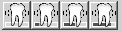
Use the Mobility toolbar to chart the mobility of a tooth.
Mobility 0—Click the first button and select a tooth to assign mobility 0. This would typically be done to remove a previously assigned mobility.
Mobility 1—Click the second button for mobility 1.
Mobility 2—Click the third button for mobility 2.
Mobility 3—Click the fourth button for mobility 3.
Note: The Mobility toolbar is customizable. To remove or add a button, right-click and select Customize.