Using the
Restorative Tab
Conditions Toolbar
The Conditions toolbar enables
you to chart tooth conditions. Each button serves as a toggle switch:
charting the same condition to a tooth a second time removes the condition
from the tooth.
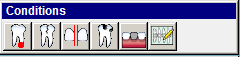
Click the following buttons to see the name and a description:
 Chart Periapical—To chart a periapical
condition, click this button and select a root tip.
Chart Periapical—To chart a periapical
condition, click this button and select a root tip.
 Chart Cracks—To chart cracks, click
this button and select a surface.
Chart Cracks—To chart cracks, click
this button and select a surface.
 Chart Diastema—To chart diastema,
click this button and select the first tooth and then the second tooth.
Chart Diastema—To chart diastema,
click this button and select the first tooth and then the second tooth.
 Chart Decay—To chart decay,
click this button and select the surfaces on a tooth.
Chart Decay—To chart decay,
click this button and select the surfaces on a tooth.
 Chart Missing Teeth—To chart missing
teeth, click this button and select a tooth.
Chart Missing Teeth—To chart missing
teeth, click this button and select a tooth.
 Other Conditions—To chart other
conditions, click this button, select another tooth condition from the
list, and then select a tooth. You can also add conditions to this list.
Other Conditions—To chart other
conditions, click this button, select another tooth condition from the
list, and then select a tooth. You can also add conditions to this list.
Note: The Conditions
toolbar is customizable. To remove or add a button, right-click and select
Customize.
Related Topics
Setting Restorative Tab
Options
Accessing the Restorative
Tab
Chart Mode Toolbar
Procedure Codes Toolbar
Mobility Toolbar
Skill Sharpeners