Using the
Restorative Tab
Chart Mode Toolbar
The buttons on the Chart Mode
toolbar enable you to view the chart in different modes:
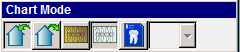
Click the following buttons to see the name and a description:
 Chart work performed inside this office—Displays
the chart in Inside Work mode.
This is work that is performed in your office.
Chart work performed inside this office—Displays
the chart in Inside Work mode.
This is work that is performed in your office.
 Chart work performed outside this office—Displays
the chart in Outside Work mode.
Outside work mode displays work
done outside your office, such as endo or extractions performed elsewhere,
or any work done before the patient came to your office.
Chart work performed outside this office—Displays
the chart in Outside Work mode.
Outside work mode displays work
done outside your office, such as endo or extractions performed elsewhere,
or any work done before the patient came to your office.
 Chart initial work—Displays the
Initial Chart,
which is made on the first examination of a patient.
Chart initial work—Displays the
Initial Chart,
which is made on the first examination of a patient.
 Chart current work—Displays the
most up-to-date charting information, or you can chart new procedures
and conditions.
Chart current work—Displays the
most up-to-date charting information, or you can chart new procedures
and conditions.
 Chart treatment plan—Displays
an existing treatment plan, or you can chart a new treatment plan. You
can select treatment plan 1, 2, or 3.
Chart treatment plan—Displays
an existing treatment plan, or you can chart a new treatment plan. You
can select treatment plan 1, 2, or 3.
Note: The Chart Mode
toolbar is customizable. There are additional buttons that can be added.
To customize, right-click and select Customize.
Related Topics
Setting Restorative Tab
Options
Accessing the Restorative
Tab
Procedure Codes Toolbar
Conditions Toolbar
Mobility Toolbar
Skill Sharpeners