Collecting Surcharges
IMPORTANT: This feature should only be used after reviewing your merchant processing agreement, all required addendums, and the applicable laws in your area.
Your practice can elect to have a surcharge applied to credit card payments processed through Payment Manager. A surcharge is a fee added to a credit card transaction to help offset processing fees charged by card networks such as Visa and MasterCard. Payment terminals often show the surcharge amount before the transaction is completed, when prompting the customer to Accept or Cancel the transaction.
The surcharge amount is a defined percentage of the transaction total (e.g., 1.5% to 3%) which cannot exceed the actual cost of processing or 3%, whichever is lower. The percentage amount charged by your practice is configured by Global Payments, Inc. (GPI) when you initiate the setup process.
Note: A surcharge cannot be applied to debit or pre-paid card transactions. The legality and rules regarding surcharges vary from state to state, and are strictly enforced by card brand networks.
Enabling Surcharges
This feature is enabled through Global Payments, Inc. (GPI).
Note: Credit card brand networks require a 30-day notice for this feature to take effect.
To enroll:
-
Contact surcharge@globalpay.com to request to have the Surcharge feature enabled.
-
Create the Surcharge Procedure Code in the WinOMS software.
Reporting
When surcharges are enabled for your practice, they are included in the Daily Transaction Report.
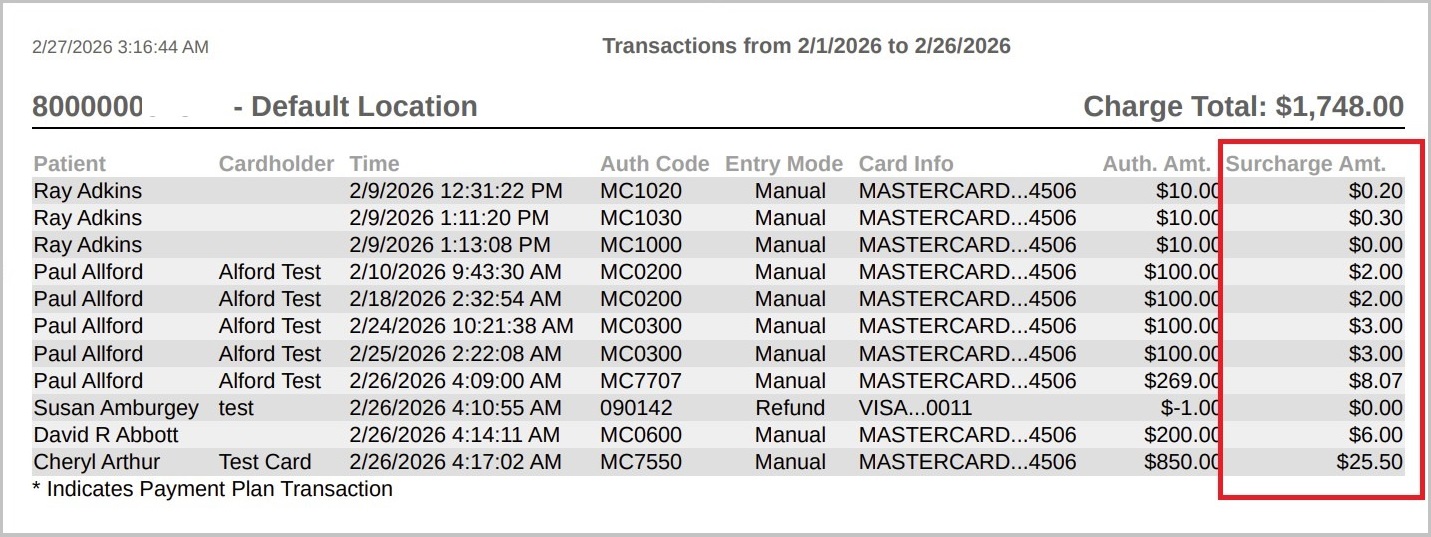
Use the Daily Transaction report to see:
-
Total surcharge fees
-
Patient-level surcharge details
-
Reconciliation against processor statements