Using the Alt Key to Adjust Image Properties
By holding down the Alt key and clicking and dragging in an image in the Image Viewing Workspace or Darkroom mode, you can adjust image brightness and contrast as described below.
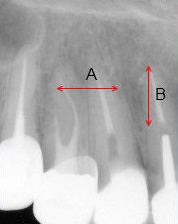 |
As you click and drag in the image window, the mouse pointer changes to |
|
|
A |
Adjust brightness by holding down the Alt key and clicking and dragging horizontally (left to increase, right to decrease). |
|
|
B |
Adjust contrast by holding down the Alt key and clicking and dragging vertically (up to increase, down to decrease). |
|
 .
.
Using the Toolbars in the Image Viewing Workspace or Darkroom Mode
Viewing Images in Slide Show Mode
Saving Images in the Image Viewing Workspace or Darkroom Mode
System-Generated Image Overlays
Displaying Image Information in Overlays