Preparing the Unit and Setting the Acquisition Options for Impression Objects
To prepare the unit for acquisition, follow these steps:
-
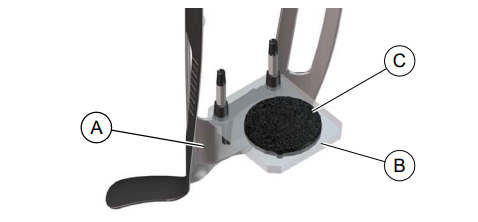
Insert the 3D bite block support (A) in the chin rest base.
-
Place the dental impression holder (B) on the 3D bite block support (A).
-
Place the black foam (C) on the dental impression holder (B) .
-
Click
 .
.
Acquiring Images of Impression Objects
Launching the Impression Acquisition
Launching the Bite Index Scan to Register the Occlusion for Impression Objects